




Musical Melons – MelonBox V1: Mix Beats With Bouncy Fruit
Play Musical Melons – MelonBox V1 instantly in your browser - No download required!
Share Musical Melons – MelonBox V1 with Friends!
Discover More Musical Melons – MelonBox V1

2048
Sprunki Phase 11

Sprunki 2048
Parasite (Incredibox Mod)

Sprunksters Episode 2: The Cave

Sprunki Wenda Treatment 3.0
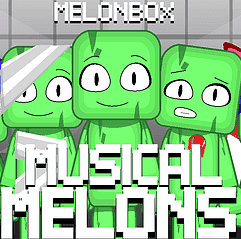
Musical Melons – MelonBox V1

Dandy’s World Pyramixed Edition

Territorial.io
It's Not My Neighbor: Labubu

Chibi Unicorn Dress Up

Tina - Pop Star

Sprunki Ice Mod - Aqua
Incredibox - Sprunki Pokemon

Sprunkibox-Sky’s MASSACRE
Sprunki Simon

Bite-Size Beats

Sprunki Anti-Shifted But Alive
Sprunki Wenda’s Dimension
Sprunki Retake (New Human Version) with Bonus
Sprunki Regretful 5.0
Sprunsi V1001
Sprunki.MSI Phase 4

Five Nights At Freddy's 2
Sprunki Anti-Shifted: Phase 3
Sprunki 12 Shifted
Sprunki Mortality With SkyBlue
Sprunki Infectibox II: The Remaster

Slide Down

City Brawl
Explore Other Exciting Games
2048
Sprunki Phase 11
Sprunki 2048
Parasite (Incredibox Mod)
Sprunksters Episode 2: The Cave
Sprunki Wenda Treatment 3.0
Musical Melons – MelonBox V1
Dandy’s World Pyramixed Edition
Territorial.io
It's Not My Neighbor: Labubu
What Is Musical Melons – MelonBox V1?
It's a fan-made rhythm toy where each melon is basically a tiny musician wearing a fruit costume. You drop different melons onto the stage, they play their own little loop, and suddenly you're a producer of chaotic, fruity soundscapes. The vibe is silly, the mix is yours, and no two tracks ever sound the same.
How to Play Musical Melons – MelonBox V1
Pick Your Melons
Scroll through the melon roster and pick the ones that catch your ear — each one brings its own beat, tone, or vocal nugget to the table.
Drop Them on Stage
Place your chosen melon characters onto the stage slots to add them to the live mix. More melons means thicker sound.
Build the Track
Swap melons in and out, stack loops, and listen as the music mutates in real time right before your eyes.
Tweak and Fine-Tune
Adjust the arrangement until the bounce is just right. There's no score, just vibes.
Reset and Remake
Clear the stage whenever you want and start a brand new mix from scratch — perfect for chasing that accidental masterpiece.
Features of Musical Melons – MelonBox V1
Cast of Quirky Melons
Every melon has its own personality and sound, turning the roster into a fruit-themed band you get to conduct.
Real-Time Beat Layering
Stack loops live and hear your creation shift the second you add, remove, or rearrange a melon.
Pure Browser Play
No installs, no logins, no drama. Just open the page and start cooking beats instantly.
Fan-Made Charm
The whole thing leans into its goofy, community-made roots — rough edges and all, in the best way.
Endless Combos
There is no winning or losing, just the dopamine of finding a mix that slaps.
Musical Melons – MelonBox V1 FAQs
Is Musical Melons – MelonBox V1 free to play?
Yep, completely free. No subscriptions, no sketchy paywalls hiding the good stuff.
Do I need to download anything?
Nope. The game runs straight in your browser, so just open the page and start dropping melons.
Is this an official Sprunki game?
Nah, it's a fan-made remix — same musical energy, fruitier twist.
Can I play Musical Melons – MelonBox V1 at school?
In most cases yes, since it's a browser game that doesn't need downloads. Bookmark it and you're set.
How many melons can I put on stage?
You can keep stacking until the stage is full, then experiment with swapping to find the sweetest mix.
Do I need musical experience to enjoy it?
Not even a little. If you can click, you can make a beat that sounds decent.
Can I save my mixes?
The game focuses on live experimentation, so think of each session as a fresh jam rather than a saved file.
What makes this different from other Sprunki games?
The fruit. Everything here is themed around melons, which gives it a goofy, summery personality you don't get elsewhere.
Will it run on my laptop or tablet?
It runs on pretty much anything with a modern browser — no beefy hardware required.
Are there combos or hidden melons?
Some melons feel rarer than others, so keep swapping and listening to uncover the full roster.
Can I play with friends?
It's built for solo play, but nothing stops you from dragging a buddy over and arguing about which melon sounds better.
Does it have a tutorial?
The mechanics click fast — just drop, listen, and tweak until you're happy.
Why You Should Play Musical Melons – MelonBox V1
Instant Beat Maker
You go from silence to a full fruity jam in under a minute — it's genuinely addictive.
Stupidly Cute Cast
The melon characters are weirdly charming, and watching them perform your mix is half the fun.
Zero Setup
Skip the install screen. Click and you're already laying down beats.
Surprisingly Creative
You start messing around and suddenly you've built something you'd actually listen to again.
Chill Zone Vibe
No timers, no fail states, no pressure. Just you, some melons, and a beat that grows.
Tricks for Mixing Better Melon Beats
Start With a Foundation
Drop a bass or drum-style melon first so every other layer has something to bounce off.
💡Build up — never start with vocals or weird effects.
Layer in Pairs
Add a melody melon, then a rhythm melon, then listen before adding more.
💡Two or three layers often sound tighter than six chaotic ones.
Swap, Don't Stack
If the mix feels muddy, remove a melon instead of adding another.
💡Subtraction is your secret weapon for clean beats.
Save Your Favorites
Track which melon combos gave you goosebumps so you can recreate them next session.
💡Screenshot your favorite stage setups before clearing.
Play Musical Melons – MelonBox V1 Right Now
No installers, no plugins, no waiting. Pull up the game in any modern browser, drop your first melon, and you're already making music. It's the quickest way to scratch that rhythm-game itch without cluttering your device.