

Sprunke Nathen Treatment – Fan-Made Beats Straight in Your Browser
Play Sprunke Nathen Treatment instantly in your browser - No download required!
Share Sprunke Nathen Treatment with Friends!
Discover More Sprunke Nathen Treatment
2048
Sprunki Phase 11
Sprunki 2048
Parasite (Incredibox Mod)
Sprunksters Episode 2: The Cave

Sprunki Wenda Treatment 3.0
Musical Melons – MelonBox V1
Dandy’s World Pyramixed Edition

Territorial.io
It's Not My Neighbor: Labubu

Chibi Unicorn Dress Up

Tina - Pop Star

Sprunki Ice Mod - Aqua
Incredibox - Sprunki Pokemon
Sprunkibox-Sky’s MASSACRE
Sprunki Simon

Bite-Size Beats
Sprunki Anti-Shifted But Alive
Sprunki Wenda’s Dimension
Sprunki Retake (New Human Version) with Bonus
Sprunki Regretful 5.0
Sprunsi V1001
Sprunki.MSI Phase 4
Five Nights At Freddy's 2
Sprunki Anti-Shifted: Phase 3
Bat Smash
Sprunki Infectibox II: The Remaster

Santa Run
Sprunki Mother’s Nature Port

Skinwalker Game
Explore Other Exciting Games
2048
Sprunki Phase 11
Sprunki 2048
Parasite (Incredibox Mod)
Sprunksters Episode 2: The Cave
Sprunki Wenda Treatment 3.0
Musical Melons – MelonBox V1
Dandy’s World Pyramixed Edition
Territorial.io
It's Not My Neighbor: Labubu
What Is Sprunke Nathen Treatment?
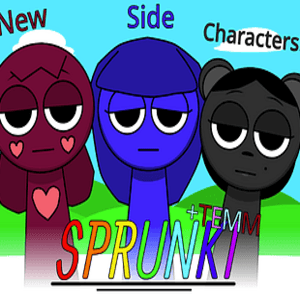
It's a fan-made music creation sandbox inspired by Incredibox, where you pull characters into the mix and stack their beats, melodies, and vocal chops into something that sounds way better than it has any right to. Each character drops their own audio loop, and the fun is figuring out which weird combinations actually slap.
How to Play
Pick Your First Character
Grab any character from the lineup and drag them onto a performer slot. Boom — instant loop. Try them solo first to learn what each one brings.
Layer More Characters
Stack up to multiple performers to weave beats, bass lines, and melodic bits together. More characters means denser sound, so don't be shy.
Swap and Rearrange Live
Drag characters out and drop new ones in whenever. The track rebuilds instantly, so you can experiment without stopping the music.
Find a Combo That Works
Listen for which vocals, drums, and bass actually click. The magic is in the combo, not any single character.
Save or Restart When It's Fire
When you hit something gold, keep it. When it's mid, wipe the board and try again — most bangers happen by accident.
Why Bother Playing
Surprisingly Deep Audio Sandbox
Character loops combine in ways that go far beyond typical music toys, so you'll keep finding new grooves.
Zero Friction Setup
No accounts, no installs, no loading wheels. You click and you're already making music.
Handmade Charm
The fan-made angle gives it real personality — every character feels like someone actually cared about how they sound.
Instant Experimentation
Swap sounds mid-track and hear results immediately, which makes it perfect for short, chaotic sessions.
Trial-and-Error Gold
Most discoveries happen by accident, and that's genuinely the best part of playing.
Jump Right In
There's nothing to install or update. Open sprunki.es, load the page, and you're basically already playing — just drag a character onto the stage and start stacking sounds. Works on school Chromebooks, office laptops, whatever browser you've got.
Tricks Worth Knowing
Start With the Beat
Always begin by dropping your drummer or beat character first. Building rhythm before adding vocals keeps the track from sounding like noise.
💡If the drums are off, nothing else matters — lock the groove first.
Use Contrast
Pair deep bass tones with high-pitched melodies and airy vocals for the richest sound. Same-frequency combos get muddy fast.
💡Try stacking only basses next — you'll hear exactly how flat it sounds.
Less Is More Early
Start with two or three characters max before pushing to five or six. You'll learn what each one adds in isolation.
💡Strip back to one character any time you feel the track getting cluttered.
Swap Aggressively
Don't settle for your first combo. Keep dragging different characters in and out — half the fun is hearing how the track transforms live.
💡Rearrange mid-playback instead of starting over; the energy stays alive.
Listen Before Adding
Before dropping a new character, actually listen to what's playing. Adding blindly is how tracks turn to mush.
💡Mute space mentally between layers so you know what's missing.
FAQ
Is Sprunke Nathen Treatment the same as Incredibox?
Nope — it's a fan-made game inspired by Incredibox's style, with its own characters and original sound loops.
Do I need to download anything?
No install, no app store. Just load the page on sprunki.es and play straight from your browser.
How many characters can I use at once?
You can stack multiple performers at the same time, and the song keeps running while you add or swap them out.
Can I save my beats?
Treat the game like a sandbox for now — focus on cooking up something that sounds great. Export options depend on the version you're playing.
Does it work on phones?
It runs in mobile browsers, though dragging characters is way smoother with a mouse on desktop.
Is it safe for kids?
It's just music mixing with cartoon characters, no sketchy content or in-game purchases to worry about.
Why is it called a 'treatment'?
It's a fan-made twist on the Incredibox formula — the name nods to the recurring 'treatment' themes in Sprunki-style games.
What kind of sounds can I make?
Beats, melodies, vocal chops, basslines — basically whatever your combo of characters decides to throw at you.
How do I get a good combo?
Stack contrasting elements: a steady beat with a melodic vocal, a bass with airy percussion. Listen for gaps and fill them.
Can I play unblocked at school?
The browser version on sprunki.es is built to be accessible, so it works on most networks without weird firewalls.
Are there hidden characters?
Fan-made versions often pack in extras or bonus combinations — try dragging characters in weird orders and see what happens.
Does it have a tutorial?
There's no formal tutorial, but the drag-and-drop setup is obvious enough that you'll figure it out in under a minute.
What You'll Find Inside
Original Vocal Loops
Every character brings their own chopped-up vocal line, so the building blocks sound fresh and not pulled from stock libraries.
Drag-and-Drop Mixing
No menus, no settings panel. Literally just pull characters onto the stage and hear the track change in real time.
Real-Time Layering
Add, remove, and swap performers mid-playback. The arrangement keeps flowing while you mess with it.
Loads in Your Browser
Runs straight off sprunki.es with no install or sign-up. Just open the tab and start messing around.
Completely Fan-Made
Built by a community creator who clearly loves Incredibox-style games, packed with personality and weird little audio surprises.